Which Cricut should i buy in 2026? This is one of the questions that i hear the most. Cricut whilst wonderful is an extremely overwhelming and confusing subject when you’re new to the topic. Over the last couple of years I’ve purchased almost all of the machines on the list and have learned a lot in the process. After trading in the joy and the explore I’ve finally settled on the Cricut maker as that’s what suits my personal and small business needs the bests. However your needs may be different to mine so with this little guide I’m hoping i can help you understand the world of Cricut machines a little more.
We’re going to be focusing on five different machines today; the joy, joy xtra, explore 4, maker 4 and the venture. some of these machines are best suited for small hobbyist whereas others have the capability to help you on the path to developing a small business and brand.
Cricut joy
With the smallest price tag and a compact design, it’s easy to see why the joy is such a popular machine. Aimed primarily at smaller projects, the joy is a great addition for any home hobbyist. The joy can be used for cutting small vinyl decals either for heat transfer or permanent vinyl products such as mugs. Unfortunately the standard joy model does not offer print then cut functionality and can only cut smart materials up to 4.5″ on other materials which limits projects quite significantly. However if you love the occasional paper craft, making cards, using small vinyl decals and have no extra requirements then this could be the one for you
Pros
- Excellent for card makers as the Cricut joy has its own exclusive card making mat.
- Good for paper crafting
- Compact Size
- Low price tag compared with other machines
- Can be used matless when combined with smart materials
- Excellent for cards, written labels and small vinyl decals
Drawbacks
- Limited to three tools (fine point blade, foiling tool and pen) which are only really beneficial for materials such as paper, thin card, foil or vinyl.
- Does not have a second tool slot so only one tool can be used at a time
- The joy’s compact size limits the size of projects
- Only certain materials are compatible with the joy
- The Cricut joy does not have a specific print then cut function meaning you cannot upload a png, print it and then cut out around the design which can be a big feature that’s used for business purposes.
- Slow cutting speed compared to other models
- unless in a bundle, the only tool included with the machine itself is the fine point blade. All other tools need to be purchased separately
compatible tools
- premium fine point blade
- pens and markers (purchased separately)
- foil transfer tool (purchased separately)
Cutting size and speed
Speed: max 5 inches per second
Cutting Size: 4.5 inches x 4ft

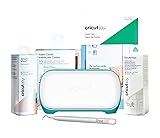
Cricut joy xtra
The Cricut joy Xtra is a pretty swish upgrade from its predecessor, not only does it keep all its original functions but it allows for a bigger cutting area of 8.25 inches wide by 11.75 inches meaning that a4 projects are totally an option! The other exciting feature that the xtra includes is the print then cut functionality. I personally love print then cut for making projects such as stickers, bookmarks, invitations and home décor. The main downside is that you are still limited to the same three tools (pen, fine point blade and foiling tool)
Pros
- Includes the print then cut feature allowing for a whole new range of products which are great for incorporating your own artwork or png designs.
- A larger cutting area than the Joy
- Utilises the card making mat for creating beautiful cards
- Great for a whole range of smaller projects such as vinyl decals for drinkware or home décor, heat transfer cuts, invitations, bookmarks, stickers and much more!
Cons
- Limited to three tools (fine point blade, foiling tool and pen) which are only really beneficial for thinner materials such as papers, thin card, foils or vinyl.
- Does not have a second tool slot so only one tool can be used at a time
- Whilst the cut size is almost doubled compared to the joy the XTRA still offers a smaller cutting size than some of the other machines.
- unless in a bundle, the only tool included with the machine itself is the fine point blade. All other tools need to be purchased separately
compatible tools
- premium fine point blade
- pens and markers (purchased separately)
- foil transfer tool (purchased separately)
Cutting size and speed
Speed: max 5.6 inches per second
Cutting Size: 8.5 inches x 4ft


Cricut explore 4
if you’re looking to start the process of turning your hobby into a small business then the Cricut explore 3 should be a possible contender on your wish list, it’s available at a lower price than the maker as it has less compatible tools but is still great for a whole range of projects that you could make for home décor, gifts or to sell! The explore cuts at a faster rate than the joy and it allows the use of several new tools (listed below). The Cricut explore handles both cut and print then cut with ease. The explore is perfect for a huge amount of products such as invitations, stickers, t-shirt vinyl’s, drinkware vinyl’s, keyrings, paper crafts and more, i even used mine to cut out my sublimation projects. There is of course the explore 3 still available on the market too, the 3 is simply the older model which is just a little slower and doesn’t have quite the same material handling.
Pros
- Introduces new tools which can be used with this machine to cut an extended list of materials (full list below)
- Cuts at a faster rate than the Cricut joy and joy xtra
- Can cut the same size as the maker and wider and longer than the Joy and Joy xtra
- Easily supports cut, write/draw, score and print then cut functions
- The ability to use a deep point blade allows you to cut through new materials such as kraft board, foam, leather, felt and thin wood veneer.
- Offers two tool clamps so that two tools can be mounted simultaneously
Cons
- Unlike the maker the explore does not support some of Cricut’s most popular tools such as the knife blade tool, the engraving tool, the debossing tip and the perforation blade.
- The Explore does not support the knife blade so it is unable to cut through thicker materials such as chipboard and softwood and does not support the rotary blade for super thin materials such as crepe paper.
- unless in a bundle, the only tool included with the machine itself is the fine point blade. All other tools need to be purchased separately
compatible tools
- premium fine point blade
- pens and markers (purchased separately)
- foil transfer tool (purchased separately)
- Deep-Point Blade (purchased separately)
- Scoring Stylus (Purchased Separately)
- Bonded Fabric Blade (Purchased Separately)
Cutting size and speed
Speed: max 14.1 inches per second
Cutting Size: 11.7 inches x 12ft


Cricut maker 4
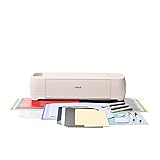
I personally upgraded to the maker last year and it was one of the best crafting choices I’ve made. The Maker is the perfect tool for small businesses to up their game and develop some fabulous new products. It’s Fast, reliable and has a boat load of compatible tools. I’m yet to run into any issues with mine and i just love how reliable it is! This machine is perfect for paper craft, batch cutting (ie keyring inserts and tshirt decals), print then cut products, Vinyl decals, engraving and designs involving thicker materials. The maker 3 is also still available for purchase, its simply an older model that is considered a little slower and less reliable than the 4.
Pros
- Fast, efficient, versatile and reliable
- Compatible with 13 different tools
- Able to cut through thicker materials such as chipboard and softwood as well as thin delicate materials such as fabric and crepe paper (Purchase of tools required)
- Two tool clamps to allow two tools to be mounted simultaneously
- Makes a huge range of projects possible for either home crafting or as a small business
- Excelling print then cut compatibility which I’ve personally found great for making products with my artwork such as stickers and bookmarks.
- Can be used to cut large vinyl decals
Cons
- unless in a bundle, the only tool included with the machine itself is the fine point blade. All other tools need to be purchased separately which is a whopping twelve tools with the maker. However these are all optional and the need to purchase them is dependent on the projects you’re making.
- Same sized cutting area as the explore, larger products may take more pieces and assembly. Decals can be cut large but the maximum width is only 11.7 inches compared to the 12ft height meaning that if your decals are square they can only be cut to roughly 11 inches or would need to be cut in sections. If you’re making very large projects you may want to consider the venture.
Compatible tools
- Premium Fine-Point Blade
- Foil Transfer Tool
- Pens & Markers
- Deep-Point Blade
- Scoring Stylus
- Bonded-Fabric Blade
- Scoring Wheels
- Rotary Blade
- Wavy Blade
- Knife Blade
- Engraving Tip
- Debossing Tip
- Perforation Blade
Cutting size and speed
Speed: max 14.1 inches per second
Cutting Size: 11.7 inches x 12ft


Cricut venture
The Cricut venture is the definition of go big or go home. This option is perfect if you’re looking to create large scale projects. with a cutting width of a huge 24 inches this monster machine is perfect for creating very large vinyl decals, paper projects and print then cut projects such as gift boxes or smaller projects in bulk. The Venture is also Cricut’s fastest machine cutting an incredible 25.4 inches per second. The main drawback of the venture is that it is only compatible with seven tools and therefore cannot cut through those heavy duty or super thin materials such as fabric or softwood. the machine itself also requires a lot of space.
Pros
- Cuts on a much larger scale, perfect for huge decorative projects such as wall art or decals.
- Has a very quick cutting speed when compared with the other machines.
- Compatible with print then cut, cut, write/draw, foiling and scoring.
- Two tool clamps to allow two tools to be mounted simultaneously
- Good For batch cutting several products in one swoop.
Cons
- The venture is a large machine that takes up a lot of space especially when mounted on a stand
- There are several tools that the venture does not support including the rotary blade, the knife blade, the engraving tip, the debossing tip, the perforation blade and the wavy blade. This means that the machine cannot cut through those super thick or thin materials effectively and it also does not engrave.
- unless in a bundle, the only tool included with the machine itself is the fine point blade. All other tools need to be purchased separately
Compatible tools
- Performance Fine-Point Blade (included)
- Foil Transfer Tool
- Pens & Markers
- Deep-Point Blade
- Scoring Stylus
- Bonded-Fabric Blade
Cutting size and speed
Speed: max 25.4 inches per second
Cutting Size: 24 inches x 12ft